Azure Databricks Disaster Recovery Automation for a Cloud Data Platform
Client: Enterprise Data Engineering Team (Cloud Gravity Solutions initiative) Stack: Azure Databricks, Terraform, Azure DevOps Deliverable: Reusable infrastructure-as-code module for cross-workspace DR replication
Marko Skendo
4/16/20241 min read

The Challenge
The client ran a production Azure Databricks workspace with hundreds of jobs, notebooks, clusters, SQL warehouses, and instance pools — all built up organically over time. They had no disaster recovery strategy. A regional outage or workspace corruption would mean days of manual reconstruction and significant data engineering downtime.
The core problem: Databricks workspaces contain complex, interdependent resources (jobs referencing specific cluster IDs, notebooks nested in directory trees, instance pools with workspace-specific identifiers) that can't be simply copy-pasted between environments.
The Solution
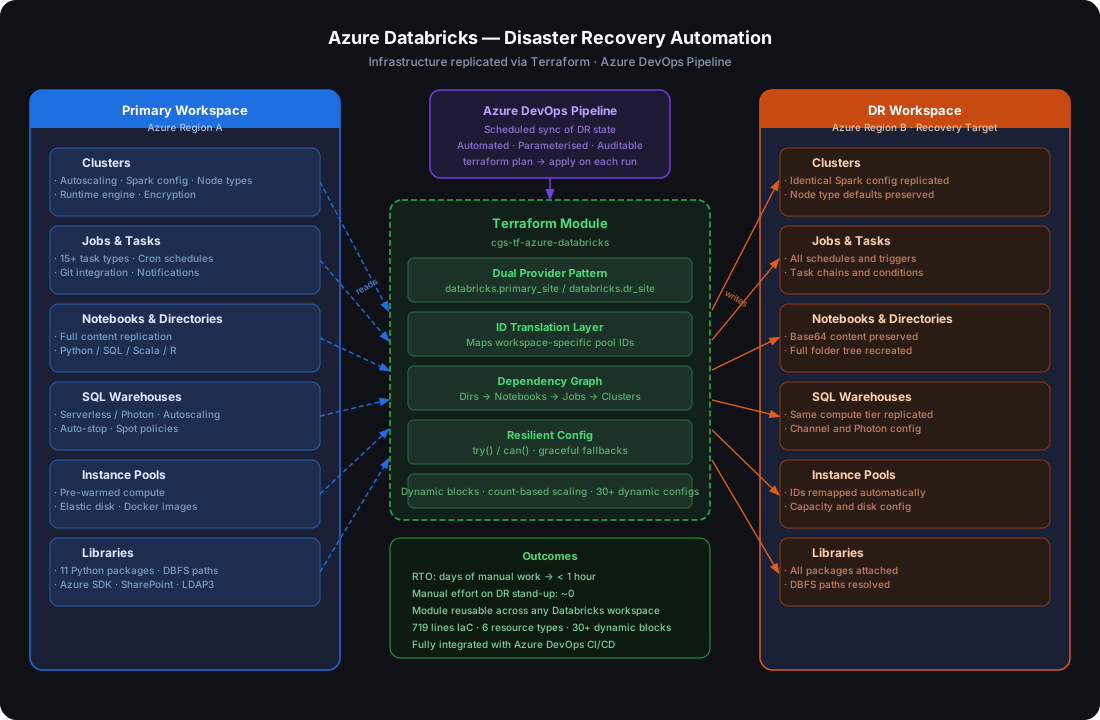
We designed and built a Terraform module that automatically replicates an entire Databricks workspace to a secondary Azure region, acting as a live DR target.
Key engineering challenges solved:
Dual-provider pattern — A single terraform apply reads from the primary workspace and writes to the DR workspace simultaneously, using Terraform provider aliases (databricks.primary_site / databricks.dr_site)
ID translation layer — Instance pool IDs are workspace-specific; we built a local mapping table that transparently remaps resource references between environments, preventing broken dependencies
Dependency-aware replication — Directories are created before notebooks, notebooks before jobs, pools before clusters — Terraform's dependency graph handles ordering automatically with no manual sequencing
15+ task type support — Spark JAR, Python, Notebook, SQL, DBT, Pipeline, and more — all replicated with full schedule, notification, and Git integration configs preserved
Resilient configuration — Extensive use of Terraform's try() and can() functions handles optional fields gracefully, so the module works across workspaces with different feature sets
The Result
~0 manual effort to stand up a DR workspace — a single pipeline run replicates the full environment
RTO dramatically reduced from days of manual work to under an hour
The module is fully parameterized and reusable across other client workspaces with no code changes
Integrated with Azure DevOps pipelines for automated, scheduled sync of DR state
"Before this, a Databricks outage meant hours of archaeology through the UI. Now we run one pipeline and the DR site is current."
Location
Bulevardi Bajram Curri, Nr. 1, Tirana, Albania, 1001