
Amazon RDS Backup Strategy
In cloud computing, efficient and reliable data management is a critical aspect of any organization's infrastructure. This post provides a comprehensive overview of an automated backup and archiving solution designed and implemented within the Amazon Web Services (AWS). The solution leverages AWS RDS for SQL Server and S3 services to ensure the secure and timely backup of databases while efficiently managing storage costs through automated archiving.
Marko Skendo
12/13/20232 min read
The scope of this use case highlights the entire architecture, implementation, and automation of a backup and archiving system for SQL Server databases hosted on AWS RDS instances. The solution caters to the diverse backup requirements of different databases across multiple AWS accounts, offering a flexible and user-friendly approach to backup scheduling and archival policies. With the use of Terraform modules, the infrastructure is easily deployable and customizable based on specific organizational needs.
Amazon RDS & SQL Server Stored Procedures
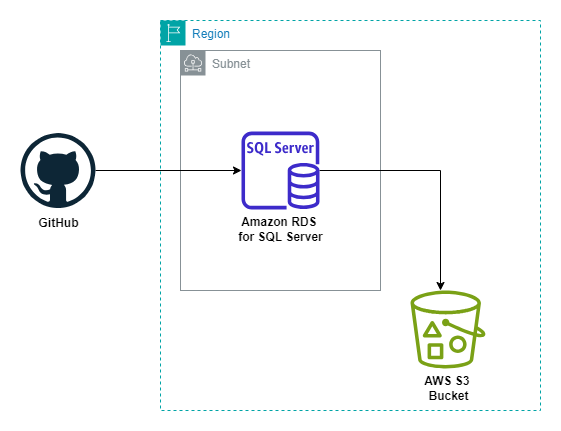
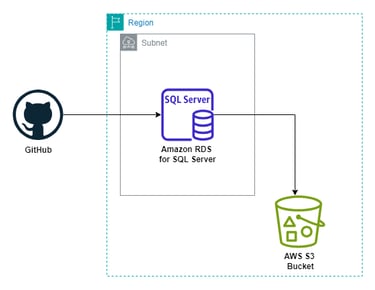
The foundation of the solution lies in the utilization of AWS RDS for SQL Server. Within each RDS instance, a stored procedure has been created to execute native backup operations. The stored procedure accepts parameters such as the source database name, S3 bucket ARN for backup storage, and an option to overwrite existing backup files. This allows for seamless and consistent backup processes across various databases. This SPC is deployed in each RDS using a GitHub actions workflow.
This GitHub workflow, triggered by a manual dispatch event, simplifies the deployment process by allowing users to input key parameters such as AWS account ID, Secret Name in AWS Secrets Manager, S3 Bucket ARN, and Database Name. The workflow dynamically configures AWS credentials, retrieves database credentials from AWS Secrets Manager, and generates a SQL script for the stored procedure. It checks the presence of the SQL Server command-line tool, sqlcmd, and deploys the stored procedure to the specified RDS instance. Additionally, it creates a SQL Server Agent job named Backup Databases, scheduled to run daily at a specified time by the user upon deployment.
SQL Server Agent Job
To automate and schedule the execution of the stored procedure, a SQL Server Agent Job has been configured for each RDS instance. The schedule of the job aligns with the desired backup frequency set by the user. This ensures that databases are backed up at specified intervals.
S3 Lifecycle Rules
An S3 Lifecycle Rule has been implemented to complement the SQL Server Agent Job. The Lifecycle Rule is set up upon the infrastructure creation and complements the schedule of the SQL Server Agent Job. It automates the archival process, transferring a specified number of backups to Glacier storage class and retaining the latest backup in the standard storage class. User-configurable parameters define the distribution of backups between standard and Glacier storage.
Terraform
The entire solution is deployed and managed using Terraform modules. This Infrastructure as Code (IaC) approach ensures consistency, repeatability, and ease of maintenance. Users can input their desired backup and archival policies during deployment.
Location
Bulevardi Bajram Curri, Nr. 1, Tirana, Albania, 1001